 AppKey
THE APPKEY SETUP GUIDE
Your Cloudflare apps.
At home on your Mac.
Check what you need, connect your team with OAuth, and put your everyday tools within reach.
AppKey is coming soon. This guide covers the current Mac build for Cloudflare account administrators. A public release date and pricing have not been announced. Join the launch list.
Before you start
AppKey brings an existing Cloudflare Access catalog to your Mac. Have these ready:
- A compatible MacmacOS 14 Sonoma or later, on Apple silicon or Intel, and an AppKey build.
- A configured Cloudflare teamA Zero Trust organization with Access applications already set up. A Cloudflare account or domain alone is not an app catalog.
- An authorized accountA Cloudflare login with permission to authorize read access to the account’s settings, Access organization and applications.
- Your browser and connectionInternet access for authorization and catalog refresh. Destination apps must be reachable through your normal browser and any network access they require.
Find your team name under Cloudflare → Zero Trust → Settings → Team name and domain. For your-team.cloudflareaccess.com, you need only your-team. Cloudflare’s team-name guide ↗
New to Cloudflare Access? First create your Zero Trust organization, configure a login method and Access policies, and add your applications. Confirm you can open a protected app in your browser. Follow Cloudflare’s setup documentation, then return here. AppKey imports your catalog; it does not create tunnels, host your apps or configure their security policies.
The current connection is for an administrator’s private local catalog. It is not an employee SSO portal or a shared catalog with per-user entitlement filtering. Google Workspace catalog import is not available in this release.
Connect with Cloudflare OAuth
You use AppKey’s registered OAuth application. There is no API token to paste and no OAuth client for you to register.
Open AppKey and enter your team
Open AppKey and choose Connect Cloudflare Access, or open Settings → Connections. Enter just the team name, without
https://or the domain suffix.your-team.cloudflareaccess.comContinue in your browser
Choose Continue with Cloudflare. AppKey opens the authorization flow in your default browser. Leave AppKey running while you sign in.
Choose the right account and authorize
Use the Cloudflare login that manages this team. Review the AppKey application, its appkey.app publisher domain, the selected account and its four read permissions. Approve them to continue. If your browser is signed in to another Cloudflare account, switch to the correct one first. About Cloudflare’s consent screen ↗
Return to your library
AppKey checks that the authorized account’s team domain matches what you entered, then imports supported apps automatically. If it asks you to choose between authorized accounts, select the one for your team. An account/team mismatch must be corrected before import.
Only the read access it needs
The current build requests these four read-only scopes. It does not request permission to change your Access policies.
| Permission | Why AppKey needs it |
|---|---|
User detailsuser-details.read | Identify the Cloudflare user authorizing the connection. |
Account settingsaccount-settings.read | Find the accounts you have authorized. |
Access organizationaccess-org.read | Verify the account’s Cloudflare team domain. |
Access applicationsaccess-app.read | Import app names, launch addresses and configured image URLs. |
Your imported library is stored on this Mac. The authorization token is stored in macOS Keychain. See AppKey’s privacy policy for storage and removal details. You can revoke authorization from your Cloudflare profile’s Manage OAuth authorizations page.
Open an app, in your browser
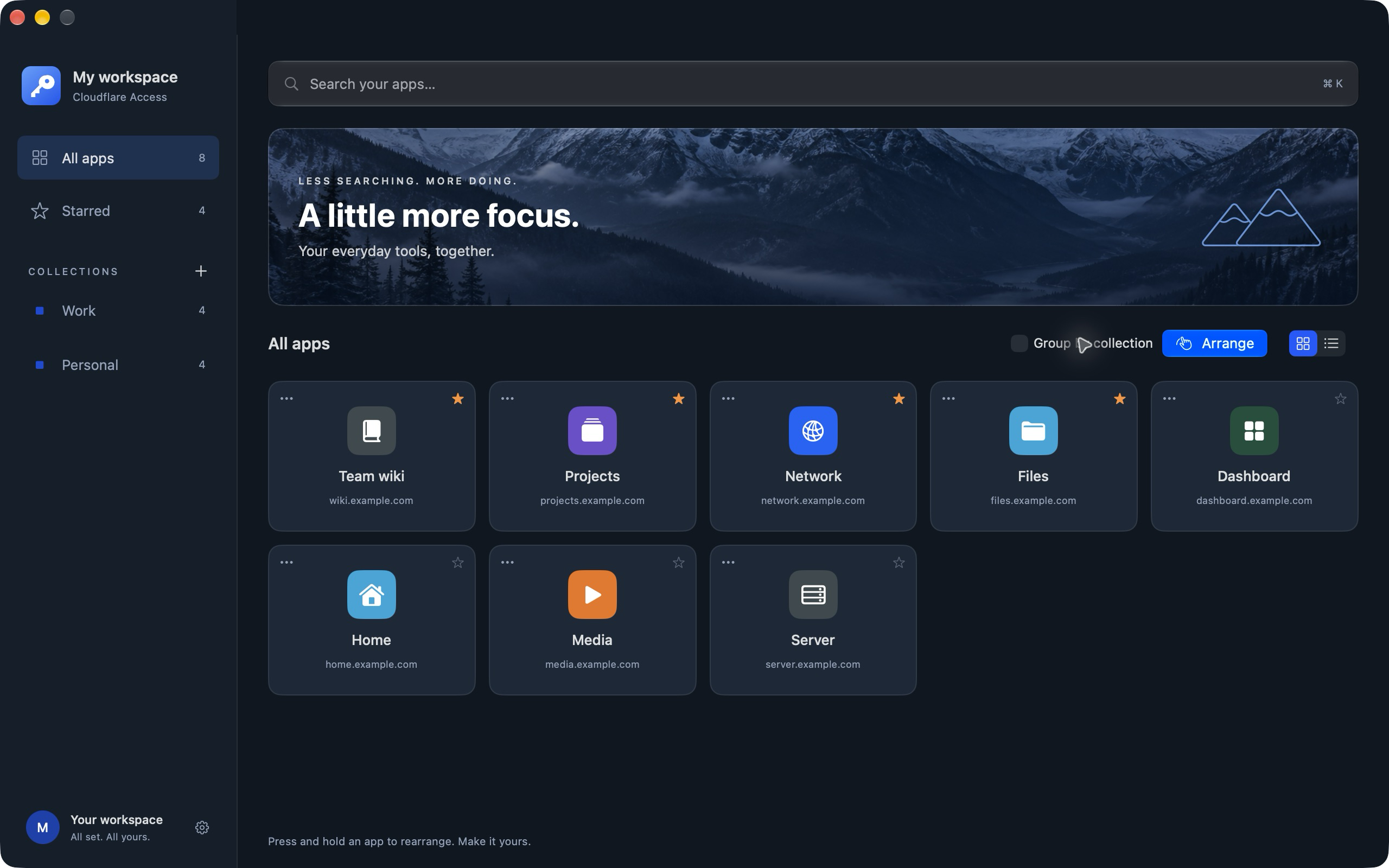
Click a tile in the library, or click the key in the macOS menu bar and choose an app. AppKey opens its normal HTTPS address in your default browser.
An existing Access session in that browser may take you straight through. Otherwise, Cloudflare can ask you to sign in, complete MFA, or meet your organization’s device or WARP requirements. The destination app can also have its own login.
Catalog authorization and app sign-in are separate. Connecting AppKey does not sign every browser or profile into your apps, and seeing an app in an administrator’s catalog does not grant access to it. Cloudflare’s policies still apply. How Access sessions work ↗
Make it yours
Favorites and collections
Star the tools you use most, then arrange your favorites. You can keep more than six favorites; the menu-bar launcher pins only the first six, in your chosen order. Scroll through All apps for the rest, or use search. Personal collections let you organize your library without changing anyone’s Cloudflare access.
One Settings page
Click the gear to open Settings inside the library. Under Appearance, edit the workspace name, welcome message, support URL, accent color and light/dark logos. Review the previews, then choose Save appearance. The saved accent follows the in-app key and menu-bar dropdown.
App theme and banner choices apply immediately across workspaces on this Mac. Workspace branding is saved locally; it is not published to everyone in your company.
Keep the launcher close
Under General, choose whether to keep AppKey in the Dock and whether to start it at login. Closing the library window keeps the key in the menu bar. Choose Open AppKey to show the library again, or right-click the menu-bar key and choose Quit AppKey to stop the app.
If something doesn’t connect
My account is missing from Cloudflare’s consent screen
Check that you signed in with the Cloudflare user who has access to the correct account. Account administrators can also restrict public OAuth applications under Manage Account → Members → Settings → Public OAuth App access. Ask the account administrator whether AppKey is permitted. Cloudflare’s administrator controls ↗
The team doesn’t match, or permission is denied
Use the team name from the selected account’s Zero Trust settings. An employee login that can open one protected app may not have account-level catalog permissions. Cancelled consent creates no connection; retry when you are ready to authorize the correct account. AppKey needs all four listed read permissions to discover and import the catalog.
My catalog is empty, or some apps are missing
Confirm that Access applications exist in the account you connected. AppKey imports supported records with a usable HTTPS launch address. Apps explicitly hidden from the launcher, wildcard-only destinations and unsupported app types are omitted. Check the application’s Experience settings → Show application in App Launcher, then choose Refresh catalog in Settings → Connections. Cloudflare application visibility ↗
The separate Cloudflare App Launcher portal does not need to be enabled for AppKey’s administrator API import.
An app icon is missing
The configured image URL must be downloadable without browser cookies or credentials. A protected or unavailable image may use a fallback icon. Check the image configuration in Cloudflare, refresh the catalog, or choose a local app image in AppKey.
The connection expired, or the browser didn’t return
Reconnect with Continue with Cloudflare. Keep AppKey open and avoid overlapping authorization attempts. AppKey uses a temporary callback on your own Mac; a return address beginning with 127.0.0.1 refers to this Mac. If authorization cannot start, cancel and retry. Contact support if the error persists.
I want to refresh or disconnect
Open Settings → Connections to refresh the catalog or disconnect Cloudflare. Disconnect clears the imported catalog and saved authorization from this Mac and attempts to revoke the authorization at Cloudflare. You can also revoke AppKey from your Cloudflare profile.
Plans and availability
A paid Cloudflare plan is not a universal requirement. Cloudflare currently offers a Zero Trust Free plan with a 50-user limit. Its organization setup documentation still asks for payment details, even when choosing Free. Check the current Cloudflare plans and onboarding requirements before confirming a subscription.
Connecting AppKey does not select a Cloudflare subscription or enable billing. Paid plans, optional Cloudflare products and the apps you host can have their own costs. AppKey’s own pricing and public release date have not been announced.
Requirements checked September 29, 2026. Cloudflare’s plans and dashboard labels can change.